In 2023, I designed the complete mobile UI for AR-craft, an augmented reality RPG.
Working alongside a game designer and UX strategist, I transformed wireframes and complex gameplay specs into a cohesive, post-apocalyptic visual system covering AR camera overlays, crafting workshops, inventory systems and high-density combat screens.
About the Project
AR-craft is a mobile role-playing game built around augmented reality.
Players explore their physical surroundings using their phone camera, collect hidden resources, craft gear and take part in battles.
The game combined several distinct layers: real-world mapping, inventory management, a crafting workshop, a tactical combat system and in-game stores.
My job was to weave all these moving parts into a single, visually compelling UI.
My Role
I collaborated closely with a game designer and a UX specialist.
They provided the initial wireframes, game assets and screen logic, while I took full ownership of the visual interface layer.
My focus was bringing those blueprints to life across every state, menu and gameplay scenario:
Character progression and stats
AR camera HUD and map views
Combat overlay
Inventory and crafting workshop
Storefront, settings and utility states
Mechanics & Game Loop
Everything in AR-craft revolves around character growth.
Players scan real-world environments through their camera to discover raw materials, then bring those items back to the workshop to forge weapons, upgrade armor and tweak stats.


Games like this can easily feel overwhelming, so the UI needed to make complex choices feel straightforward.
Players had to instantly see what resources they owned, what could be upgraded right now and how those actions impacted their character.
The Workshop & Item Hierarchy
The crafting workshop was the most data-heavy section of the project.
Balancing rarity levels, parameters, upgrade costs and item states can easily clutter a phone screen.


To keep things readable, I built a strict visual hierarchy: item first, quality second, action third, cost last.
I used color-coded borders, star ratings and bold action buttons so players could quickly separate basic gear from legendary loot at a glance.
Combat HUD
The combat screen demanded a completely different layout strategy.
The interface needed to be sharp and responsive without blocking the main battle scene in the center of the viewport.

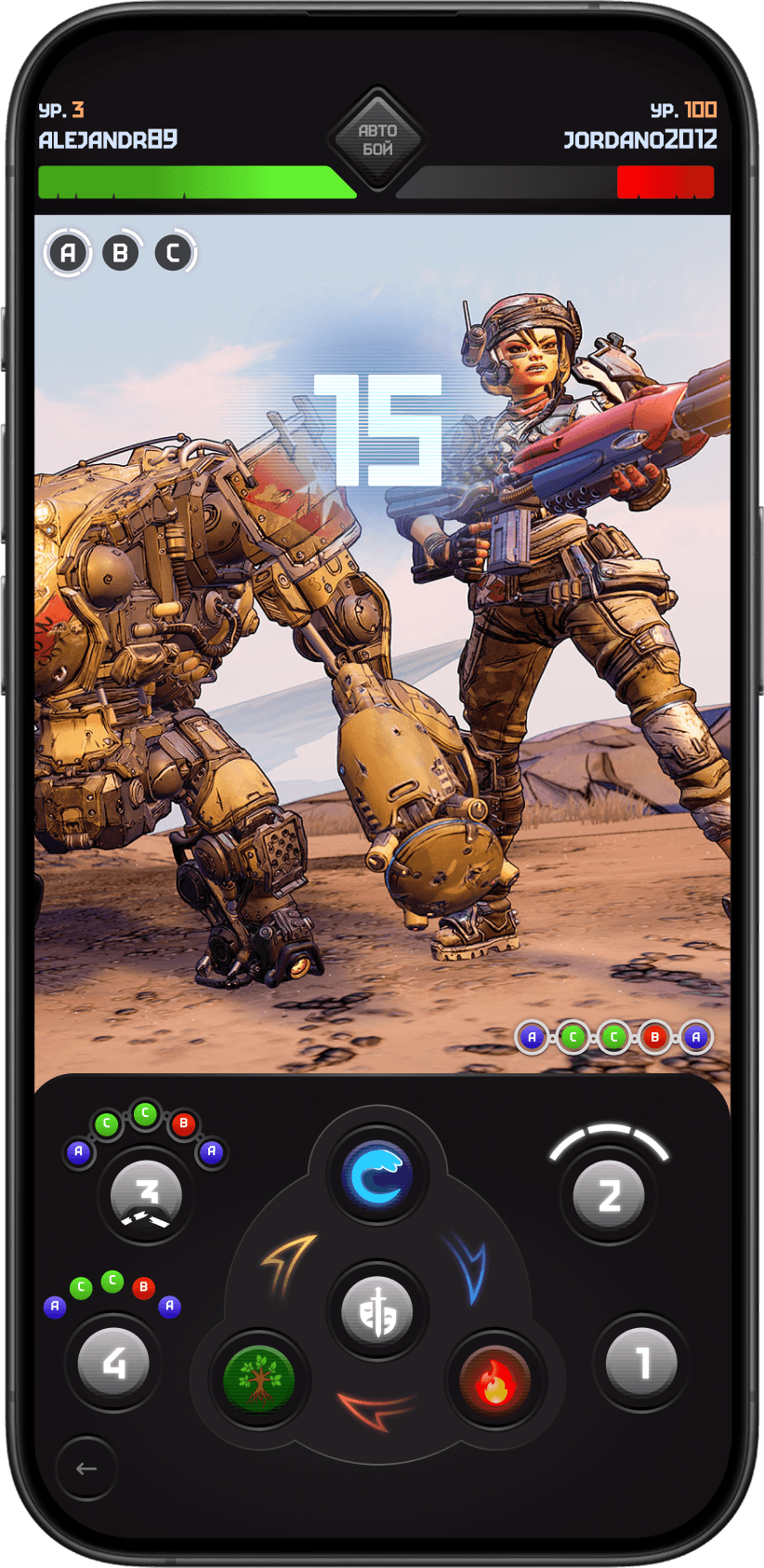
I placed primary attack controls at the bottom where thumbs naturally rest, and pushed health bars and status indicators to the top edge.
The UI elements here used higher contrast and punchier styling to support split-second decisions during battle.
Process
Despite the semi-illustrated, atmospheric look, the entire UI was built in Figma using pure vector layers.
I created depth using strong composition, subtle noise textures, glowing accents and layered glass effects.
It felt thematic and post-apocalyptic while staying lightweight, scalable and easy for developers to implement.
Takeaways
I delivered a complete, production-ready UI package covering all primary screens and edge states.
While the project was put on hold before its official release, the entire visual system was fully built and handed off to engineering.
AR-craft was a great exercise in game UI design, pushing me to blend tactical RPG depth with camera-based AR interactions in a gritty, post-apocalyptic world.
